


Serengeti Legal Tracker Invoice Submission Guide
Top takeaways
- Thomson Reuters Legal Tracker invoice submission enables law firms and corporate users to post invoices directly through the platform, with built-in LEDES support
- Company users can post invoices on behalf of law firms or vendors that lack direct access to the system
- The platform includes a LEDES Generator for entering fee and expense line items in compliance with standard billing formats
- Understanding submission mechanics reduces rejection rates and accelerates payment cycles
- Proper invoice formatting and adherence to client guidelines are essential before any submission attempt
Introduction
Thomson Reuters Legal Tracker invoice submission is an e-billing process used by corporate legal departments to manage outside counsel invoices, matter budgets and legal spend. Law firms submit invoices through the portal, where they undergo validation against client-specific outside counsel guidelines, LEDES file requirements and billing policies. As a member of the Carrier Ready Knowledge Team, I often delve into the intricacies of e-billing and invoice submission, particularly when using platforms like Thomson Reuters Legal Tracker. Our work frequently involves understanding the LEDES file structures, such as the 1998B format, which is crucial for ensuring compliance during invoice submissions.
Thomson Reuters Legal Tracker Invoice Submission Overview
The platform accepts invoices in two primary modes: direct entry through the web interface and LEDES file upload. Company users — typically in-house counsel or legal operations staff — can post invoices on behalf of law firms or vendors that do not have access to the platform. This capability allows corporate clients to maintain centralized invoice processing even when outside counsel lacks portal credentials or prefers alternative submission methods.
Invoice submission triggers a series of automated validations. The system checks UTBMS task and activity codes, billing increments, narrative sufficiency and compliance with the client's uploaded outside counsel guidelines. Rejections occur at submission when the file structure is invalid or when line items violate hard-stop rules configured by the client. Soft flags — items that generate warnings but do not block submission — appear in the invoice detail view and may prompt bill review reductions downstream.
Understanding the LEDES 1998B file format is essential for law firms preparing invoices outside the portal interface. The LEDES Oversight Committee's 98B format page defines the field set precisely; several portals accept files that omit fields the specification marks as required. This discrepancy underscores the importance of adhering to the published specifications to avoid potential rejections during the submission process.
Successful Thomson Reuters Legal Tracker invoice submission depends on three elements: a valid LEDES file or complete data entry, alignment with the client's outside counsel guidelines, and accurate UTBMS coding. Each element is independently verified, and a failure in any one will delay or prevent posting. The sections that follow address common submission obstacles, step-by-step procedures and strategies for reducing rejection rates.
Common Thomson Reuters Legal Tracker Invoice Submission Failures
Law firms submitting invoices through Thomson Reuters Legal Tracker encounter a set of procedural and technical obstacles that can delay payment and trigger automatic rejections. The platform accepts invoices in both LEDES and non-LEDES formats, but each submission path carries its own set of requirements and failure points. When an invoice enters the system, it does not necessarily move straight to approval — it can land in a holding status that requires action from multiple parties before the client ever sees the bill.
Common Submission Failures and Their Triggers
Incomplete on-boarding is a recurring blocker. LEDES error code suffix 9 indicates that the law firm's on-boarding process is incomplete, which prevents them from submitting invoices. Until the firm completes every registration step the client requires, the portal will not accept any invoice, regardless of format or content. This is not a soft warning — it is a hard stop.
Missing client and matter numbers create another common failure. To post an invoice with SpeedPost in Thomson Reuters Legal Tracker, the invoice must be in the LEDES format and the firm's client and matter numbers must be entered in Tracker. If either identifier is absent or mismatched, the upload fails at the validation stage, and the firm receives an error message rather than a submission confirmation.
The Delivery-on-Hold Trap
Even when an invoice passes initial validation, it can enter a Delivery on Hold status that requires the responsible attorney to complete tasks before the invoice moves forward. Tracker sends automatic reminders to responsible attorneys if tasks are not completed within seven days of the invoice upload, but if no one responds, the clock runs until the 45-day threshold triggers an automatic rejection. Billing clerks can send manual reminders, but they cannot bypass the workflow — the responsible party must act.
Some clients require a status report or case plan before they will accept any invoice on a matter. LEDES error code suffix 28 appears when an initial or updated status report is required before the law firm can submit an invoice on the matter, and suffix 25 appears when an initial or updated case plan is required. These are client-procedure errors, not file-format errors, and they cannot be resolved by resubmitting the same invoice. The firm must deliver the requested document through the appropriate channel, wait for the client to acknowledge it, and only then resubmit the invoice.
Format Confusion and Validation Gaps
Although Tracker does not require firms to post invoices in the LEDES format, some companies request that their firms generate and post invoices using a LEDES format. When a client does require LEDES, the firm must determine which variant the client accepts and whether the portal enforces the full specification. Tracker defines two different categories of electronic invoices: LEDES and non-LEDES, but it does not publish a field-by-field validation matrix, so firms often learn the client's true requirements only after the first rejection.
For more detail on how portal validation errors arise and how to resolve them, see E-Billing Portal Invoice Rejections: Common Causes and Fixes.
How to Submit Invoices in Thomson Reuters Legal Tracker
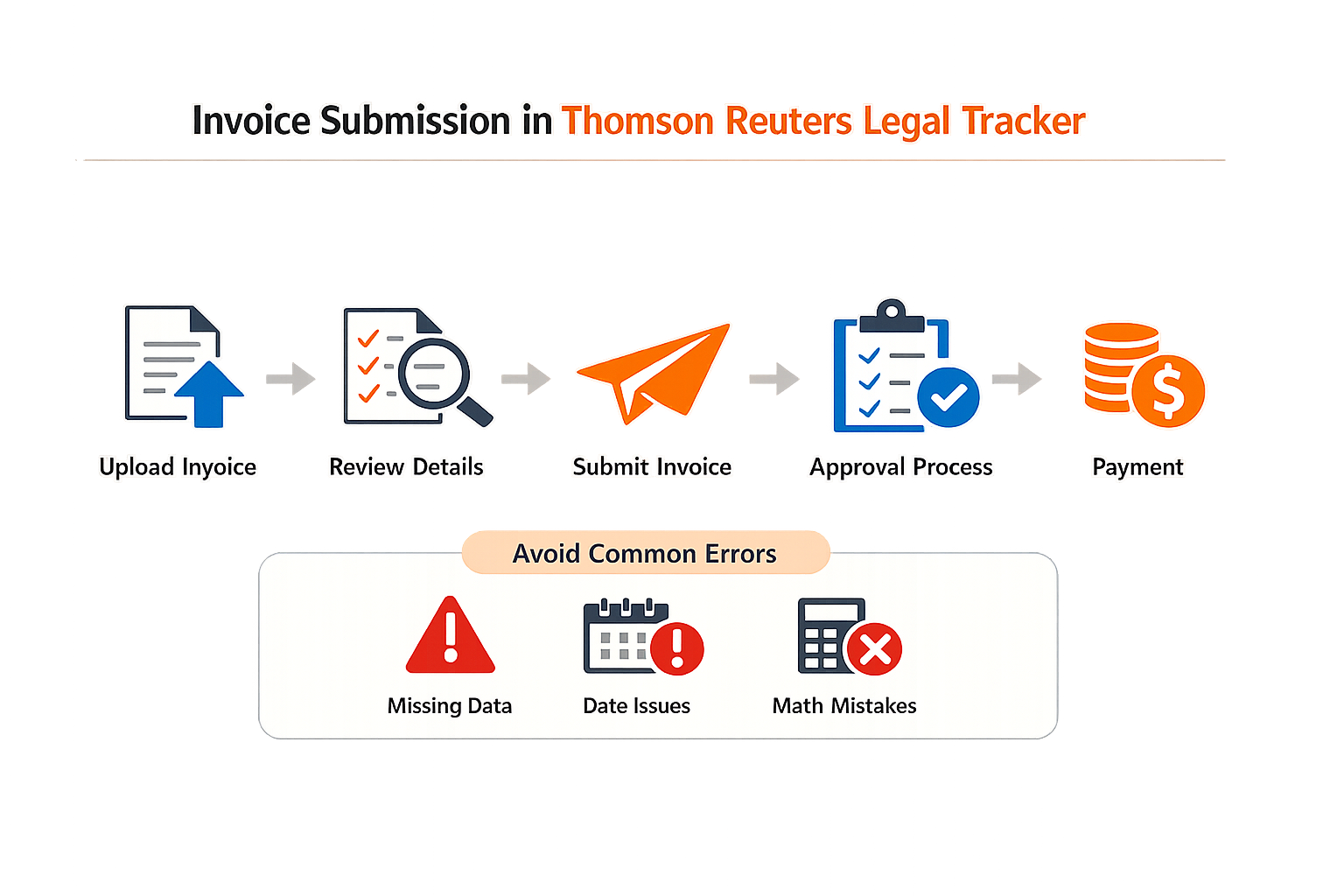
Submitting an invoice in Thomson Reuters Legal Tracker requires attention to format, matter setup, and the submission method you choose. The platform accepts both LEDES and non-LEDES electronic invoice formats, though many corporate clients request LEDES specifically. The submission path you follow depends on whether your file contains one invoice or multiple invoices, and whether your firm's matter numbers are already registered in Tracker.
Step 1: Verify Matter Setup in Tracker
Step 1
Confirm client and matter numbers
Before you attempt any submission, verify that your firm's client and matter numbers for the engagement are entered in Tracker. The platform requires this information to route the invoice correctly. If you plan to use the Speed Post feature, this step is mandatory — Speed Post will reject files when matter numbers are missing or mismatched.
Log into Tracker and navigate to the matter record. Confirm that the client identifier and matter identifier match the values your billing system will embed in the LEDES file. A mismatch at this stage triggers a rejection that is easier to prevent than to appeal.
Step 2: Prepare Your Invoice File
Step 2
Choose LEDES or non-LEDES format
Thomson Reuters Legal Tracker defines two categories of electronic invoices: LEDES and non-LEDES. Although Tracker does not require LEDES format for all submissions, some companies request that their firms generate and post invoices using a LEDES format. Confirm your client's preference before you generate the file.
If your client requires LEDES, export your invoice in the LEDES 1998B format from your billing system. The LEDES 1998B File Format guide explains the 24-field structure and common export errors. Ensure that the file contains only one invoice unless you intend to use Speed Post for a batch submission. A file with multiple invoices submitted through the standard posting method will trigger Error 014, which states: "The file that you posted contains multiple invoices. You can post such a file only using the Tracker Speed Post™ feature."
Step 3: Submit the Invoice
Step 3
Select the appropriate submission method
For a single-invoice LEDES file, use the standard invoice posting workflow in Tracker. Navigate to the matter, select the invoice attachment option, and upload your file. For files containing multiple invoices, use Tracker Speed Post. Speed Post requires that the invoice be in LEDES format and that your firm's client and matter numbers are entered in Tracker.
If you receive Error 014 during submission, you have two correction paths. If the file intentionally contains multiple invoices, switch to Speed Post and resubmit. If the file unintentionally includes more than one invoice, correct the file so that it contains only one invoice, then resubmit through the standard posting method.
Step 4: Monitor for Validation Errors
After submission, Tracker runs validation checks against the file structure and the matter data. Common rejection triggers include mismatched matter numbers, missing required fields, and format violations. If the invoice is rejected, Tracker displays an error code and a brief explanation. Review the error message, correct the underlying issue in your billing system, regenerate the file, and resubmit.
For persistent validation failures, compare your file against the LEDES Oversight Committee's published specification for the 1998B format. Some billing systems export files that omit fields the specification marks as required, and Tracker's validation may catch discrepancies that your local export tool does not flag.
Tips and Tricks for Efficient Invoicing
Law firms that treat Thomson Reuters Legal Tracker invoice submission as a one-time upload often trigger the same rejections month after month. The platform provides detailed error messages and auditing tools, but efficiency comes from using those tools before the invoice leaves the firm's time and billing system, not after it lands in Tracker's rejection queue.
Use the LEDES format auditing tool before submission
Tracker includes a comprehensive LEDES format auditing tool that identifies problems and provides specific solutions. With each error message, Tracker provides a help link to explain the action the law firm needs to take to correct the error. Running the invoice through this tool before final submission catches format errors that would otherwise delay payment. The printed version of an invoice may look acceptable, but the method the time and billing system used to generate a LEDES invoice is different than the method used to generate the printed version — a clean PDF does not guarantee a clean LEDES file.
When a LEDES file fails validation, the error message pinpoints the field and line number. Address the root cause in the billing system's export settings rather than manually editing the file, which introduces new errors and does not prevent recurrence on the next invoice.
Trigger reminders for incomplete tasks
If an invoice has a status of Delivery on Hold for more than 45 days, Tracker automatically rejects the invoice back to the firm. Billing clerks can trigger reminder email messages to the responsible parties to manage the resolution of incomplete tasks. Tracker also sends automatic reminders to responsible attorneys if tasks are not completed within seven days of the invoice upload. Firms that wait for the automatic rejection lose six weeks of the payment cycle; firms that use the reminder function close tasks within the first week.
Step 1
Monitor invoice status daily
Log into Tracker and review all invoices in Delivery on Hold status. Identify the incomplete task and the responsible attorney. Send the reminder before the seven-day automatic trigger.
Step 2
Escalate stalled approvals
When an attorney does not respond to the first reminder, billing clerks should escalate to the matter partner or billing partner. The 45-day automatic rejection is not negotiable, and Tracker does not extend the deadline.
Understand the difference between LEDES and non-LEDES formats
There are many different electronic formats available for creating invoices and you can submit an electronic invoice in any format that your client accepts. Tracker defines two different categories of electronic invoices: LEDES and non-LEDES. Although Tracker does not require you to post invoices in the LEDES format, some companies request that their firms generate and post invoices using a LEDES format. When a client specifies LEDES, submitting a non-LEDES invoice triggers a rejection even if the line items and totals are identical.
For firms using SpeedPost, the requirements are non-negotiable: the invoice must be in the LEDES format, and your firm's client and matter numbers for the matter must be entered in Tracker. SpeedPost does not accept non-LEDES files, and missing matter numbers block the upload entirely.
A clean LEDES file is not the same as a clean printed invoice — validate the export, not the PDF.
Review detailed error messages for LEDES XML invoices
If there are errors when you post LEDES XML 2.1 invoices, Tracker provides detailed error messages that help you locate and troubleshoot the issue. XML errors are more granular than 1998B errors because the schema enforces element nesting, data types, and required attributes that the flat-file format does not check. Read the error message for the specific element and attribute that failed validation, then trace that element back to the billing system's XML export configuration. Generic troubleshooting wastes time; the error message tells you exactly which field is malformed.
For additional guidance on structuring line-item detail that meets carrier expectations, see our article on block billing: reasons for carrier rejections and solutions.
Conclusion
Effective invoice submission in Thomson Reuters Legal Tracker depends on completing the on-boarding steps, understanding the client's format requirements, and preparing accurate LEDES files when those files are requested. The platform accepts both LEDES and non-LEDES invoices, but many clients specify LEDES 1998B as the required format. Law firms that submit invoices before completing on-boarding, or that fail to provide required status reports or case plans, will encounter rejections that delay payment and create administrative friction.
As a member of the Carrier Ready Knowledge Team, I often delve into the intricacies of e-billing and invoice submission, particularly when using platforms like Thomson Reuters Legal Tracker, formerly known as Serengeti Legal Tracker. Our work frequently involves understanding the LEDES file structures, such as the 1998B format, which is crucial for ensuring compliance during invoice submissions. The LEDES Oversight Committee's 98B format page defines the field set precisely; several portals accept files that omit fields the specification marks as required. This discrepancy underscores the importance of adhering to the published specifications to avoid potential rejections during the submission process.
Law firms that invest time in understanding the submission workflow — including the SpeedPost feature's requirement for pre-entered client and matter numbers — reduce the incidence of rejections and write-downs. Tracker's invoicing overview makes clear that the platform supports multiple formats, but the client's guideline determines which format is acceptable. When a client requires LEDES, the firm must generate a compliant file; when the client accepts non-LEDES formats, the firm has more flexibility. Either way, the on-boarding checklist and the client's procedural requirements control the submission path.
For firms navigating invoice rejections across multiple e-billing platforms, understanding common error codes and resolution steps is essential. Our guide to e-billing portal invoice rejections provides additional context on how portals validate submissions and what triggers a rejection. Law firms that treat Thomson Reuters Legal Tracker as one destination in a broader e-billing strategy — rather than an isolated system — build processes that scale across clients and reduce the time spent on resubmissions and appeals.
Frequently asked questions
What is Thomson Reuters Legal Tracker invoice submission?
Thomson Reuters Legal Tracker invoice submission is the process law firms use to post invoices through the Legal Tracker e-billing platform. The system validates invoices against client guidelines, LEDES file requirements and billing policies before routing them to corporate legal departments for approval.
How do I submit an invoice in Thomson Reuters Legal Tracker?
Log into Legal Tracker, verify your client and matter numbers are entered in the system, prepare your invoice in LEDES or the client's accepted format, navigate to the matter record, and upload your file. For multiple invoices, use the Speed Post feature with LEDES-formatted files.
What causes Thomson Reuters Legal Tracker invoice rejections?
Rejections occur when on-boarding is incomplete (error code suffix 9), client or matter numbers are missing, required status reports or case plans are not submitted (suffix 28 or 25), or when LEDES file structure violates the client's validation rules. Invoices in Delivery on Hold status for over 45 days are automatically rejected.
Can I submit non-LEDES invoices in Thomson Reuters Legal Tracker?
Yes. Thomson Reuters Legal Tracker accepts both LEDES and non-LEDES electronic invoices, but many corporate clients request LEDES format specifically. Confirm your client's format requirements before generating the file. Speed Post requires LEDES format.
How long does Thomson Reuters Legal Tracker hold an invoice before automatic rejection?
Tracker automatically rejects invoices that remain in Delivery on Hold status for more than 45 days. The system sends automatic reminders to responsible attorneys after seven days, but if tasks remain incomplete, the invoice is rejected at the 45-day mark.