

How to Create a LEDES Invoice 1998B for E-Billing
Introduction
A LEDES 1998B invoice is a pipe-delimited text file that e-billing systems require when you submit legal invoices electronically. The Legal Electronic Data Exchange Standard, published in 1998 revision B, defines 24 fields — each with a defined data type, maximum length, and requirement status — that carriers and corporate clients use to ingest bills from hundreds of firms without custom parsing. A single misformatted date or a null value in a required field is enough to trigger an invoice rejection at the portal gate.
The format serves two purposes: it standardizes invoice structure so that receiving systems can process submissions automatically, and it enforces a minimum level of data completeness before human review begins. Fields such as INVOICE_DATE, INVOICE_NUMBER, CLIENT_ID, and LAW_FIRM_MATTER_ID must appear on every line; optional fields like INVOICE_DESCRIPTION provide narrative context but do not block submission if left empty. Understanding which fields are required, what values they accept, and how the receiving system validates them is the difference between a clean first submission and a cycle of rejections that delays payment by weeks.
Why LEDES 1998B Matters for E-Billing
Most carrier outside counsel guidelines and corporate legal departments specify LEDES 1998B as the mandatory submission format. The specification is published by the LEDES Oversight Committee and remains the dominant standard for time-and-expense invoices, even as newer formats like LEDES 1998BI and LEDES XML have emerged for specialized use cases. When a guideline states that invoices must be submitted in LEDES format, it means a pipe-delimited text file with fields in the order and format defined by the 1998B specification.
E-billing portals perform automated validation the moment a file is uploaded. The validator checks field count, data types, date formats, required-field completeness, and arithmetic consistency between line-item totals and the invoice total. If the INVOICE_TOTAL field does not match the sum of all LINE_ITEM_TOTAL values within a reasonable variance — typically one percent — the system flags an arithmetic error and rejects the file. If a required field like LINE_ITEM_NUMBER_OF_UNITS contains zero or a null value on a fee line item, the validator treats it as a structural error unless the line is flagged as an invoice-level adjustment.
Creating a compliant LEDES 1998B invoice means populating each field according to its specification, formatting dates as YYYYMMDD, encoding currency values with the correct decimal precision, and ensuring that every required field on every line contains a valid, non-null value. The LEDES 1998B File Format - All 24 Fields Explained article provides a field-by-field reference; this guide focuses on the creation workflow and the checks that prevent rejection before you upload.
Problem Statement
A single null value in a required field will cause an e-billing portal to reject the entire invoice. The LEDES 1998B specification marks eleven fields as required, and each one triggers a validation error when left empty. Firms that generate LEDES files from time-and-billing software often discover these errors only after upload, when the portal returns a rejection message and the invoice misses the submission deadline.
Most rejections stem from three categories of error: missing required values, mismatched data types, and arithmetic discrepancies. The LEDES 1998B Field Specification states that INVOICE_DATE, INVOICE_NUMBER, CLIENT_ID, LAW_FIRM_MATTER_ID, INVOICE_TOTAL, BILLING_START_DATE, BILLING_END_DATE, LINE_ITEM_NUMBER and LINE_ITEM_NUMBER_OF_UNITS are all required fields, and a null value in any of them constitutes an error. When a timekeeper forgets to assign a matter code or leaves a line-item quantity blank, the export routine writes an empty string to the file, and the receiving system stops processing.
Date and Numeric Format Violations
Date fields must follow the eight-digit YYYYMMDD format exactly. BILLING_END_DATE, BILLING_START_DATE and INVOICE_DATE all require this structure; any deviation — a hyphen separator, a two-digit year, or a trailing timestamp — will fail validation. Currency and numeric fields present a parallel risk: INVOICE_TOTAL is defined as a twelve-digit currency value with four decimal places, and LINE_ITEM_NUMBER_OF_UNITS is a ten-digit numeric with four decimals. Firms that round hours to two decimals or omit trailing zeros may pass their own internal checks but still trigger a type mismatch at the portal.
Arithmetic Reconciliation Failures
The specification requires that INVOICE_TOTAL equal the sum of all LINE_ITEM_TOTAL values for that invoice number. Receiving applications are encouraged to verify this sum within a reasonable variance — typically one percent — to account for rounding errors made when the sending application calculated individual line-item totals. When the discrepancy exceeds that threshold, the portal treats the file as arithmetically invalid and returns it unprocessed. Firms that apply manual adjustments in their billing system without updating the corresponding line items will produce an INVOICE_TOTAL that cannot be reconciled, and the rejection notice will cite an arithmetic mismatch rather than a missing field.
Duplicate and Orphaned Identifiers
LINE_ITEM_NUMBER must be unique for each line item within an invoice, though the numbers need not be consecutive. Firms that reuse sequence numbers across billing cycles or fail to refresh their primary keys will create collisions that some portals flag immediately and others silently overwrite, leading to lost detail. Similarly, the specification states that for each INVOICE_NUMBER only the first occurrence of INVOICE_DATE, INVOICE_TOTAL, BILLING_START_DATE, BILLING_END_DATE and INVOICE_DESCRIPTION is valid; subsequent rows with the same invoice number may carry different header values, but the portal will disregard them. This rule becomes a trap when a firm splits one invoice across multiple export batches and the header fields drift between batches.
How Do You Create a LEDES 1998B Invoice?
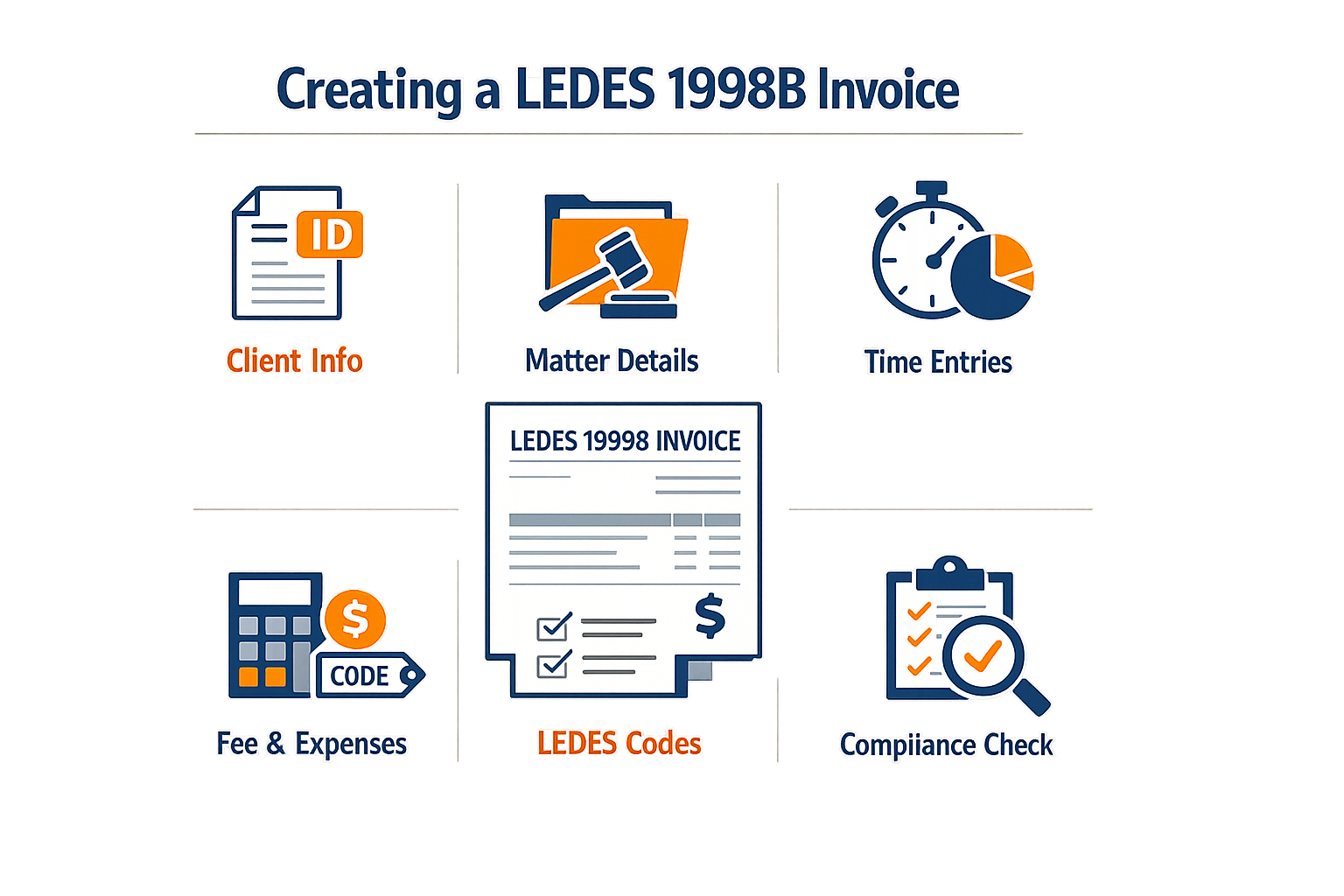
Creating a compliant LEDES 1998B invoice means populating each required field according to the published specification and ensuring that every line item carries the data the receiving system expects. The process is sequential: gather the invoice-level data first, then build each line item with its own unique identifier and billing detail.
Step 1
Populate the invoice-level fields
Begin with the seven invoice-level fields that appear once per invoice, regardless of how many line items follow. INVOICE_DATE (field 1) is an 8-digit date in YYYYMMDD format; a null value triggers an error. INVOICE_NUMBER (field 2) is the law firm's alphanumeric invoice identifier, up to 20 characters, and must be unique. CLIENT_ID (field 3) and LAW_FIRM_MATTER_ID (field 4) are also required and limited to 20 characters each. INVOICE_TOTAL (field 5) is the sum of all LINE_ITEM_TOTAL values on the invoice, expressed in currency format with up to four decimal places. BILLING_START_DATE (field 6) and BILLING_END_DATE (field 7) bracket the billing period; both are 8-digit YYYYMMDD dates and cannot be null. INVOICE_DESCRIPTION (field 8) is optional and may contain up to 15 KB of summary text.
Step 2
Assign a unique LINE_ITEM_NUMBER to each entry
Every fee or expense entry on the invoice requires a LINE_ITEM_NUMBER (field 9), a character string up to 20 characters that must be unique within the invoice. Most firms use the time-entry primary key from their financial system. LINE_ITEM_NUMBERs need not be consecutive, but a null value is an error. This field is the receiving system's primary key for tracking adjustments, reductions and appeals at the line-item level.
Step 3
Enter the number of units and calculate the line total
LINE_ITEM_NUMBER_OF_UNITS (field 11) records the quantity billed: hours for fee entries, item count for expenses. The field accepts up to four decimal places. A value of zero or null is an error unless the line item is an invoice-level adjustment, in which case the field is ignored. Multiply units by the applicable rate to produce LINE_ITEM_TOTAL, which the receiving system will sum across all rows and compare to the INVOICE_TOTAL you declared in field 5. A variance greater than one percent typically triggers a validation error and blocks submission.
Step 4
Validate field formats and required values before export
Before writing the file, confirm that every required field contains a non-null value, that all date fields use the 8-digit YYYYMMDD format, and that currency and numeric fields carry no more than four decimal places. The LEDES 1998B specification treats a null value in any required field as an error. Run a pre-export check that sums the LINE_ITEM_TOTAL values and verifies the result matches INVOICE_TOTAL within a reasonable rounding tolerance. Discrepancies at this stage are easier to correct than after portal rejection.
How to Structure Each LEDES 1998B Invoice Line Item
Each line item occupies one row in the file and repeats the invoice-level fields in columns 1 through 8, even though only the first occurrence is read. Columns 9 onward carry the line-item detail: LINE_ITEM_NUMBER, EXP/FEE/INV_ADJ_TYPE, LINE_ITEM_NUMBER_OF_UNITS, LINE_ITEM_ADJUSTMENT_AMOUNT, LINE_ITEM_TOTAL, LINE_ITEM_UNIT_COST, LINE_ITEM_DATE, and the optional LINE_ITEM_TASK_CODE, LINE_ITEM_ACTIVITY_CODE, LINE_ITEM_EXPENSE_CODE and LINE_ITEM_DESCRIPTION. Populate only the code fields relevant to the entry type: task and activity codes for fees, expense codes for expenses, and none for invoice-level adjustments. For a detailed breakdown of all 24 fields, see our guide to the LEDES 1998B file format. For guidance on choosing the correct activity codes, see UTBMS Activity Codes A101-A111 for Legal Billing.
| Field | Fee Entry | Expense Entry | Invoice Adjustment |
|---|---|---|---|
| LINE_ITEM_NUMBER_OF_UNITS | Hours (required) | Item count (required) | Ignored |
| LINE_ITEM_TASK_CODE | UTBMS code (optional) | Not used | Not used |
| LINE_ITEM_ACTIVITY_CODE | UTBMS code (optional) | Not used | Not used |
| LINE_ITEM_EXPENSE_CODE | Not used | UTBMS code (optional) | Not used |
Once all line items are complete, export the file as pipe-delimited text with the .ledes extension and upload it to the e-billing portal. Most portals validate the file on receipt and return an immediate error report if required fields are missing, dates are malformed, or the INVOICE_TOTAL does not match the sum of line totals.
Tips and Tricks for LEDES 1998B Invoices
A clean LEDES 1998B invoice passes validation the first time. The difference between a file that clears and one that triggers a rejection often comes down to a handful of recurring mistakes — null values in required fields, mismatched totals, and invoice-level data duplicated across every line item.
Check Required Fields Before Export
Every required field must contain a value. INVOICE_DATE, INVOICE_NUMBER, CLIENT_ID, LAW_FIRM_MATTER_ID, INVOICE_TOTAL, BILLING_START_DATE, BILLING_END_DATE and LINE_ITEM_NUMBER are all mandatory. A null value in any of these fields is an error, and most e-billing portals reject the file at upload.
Before you export, run a completeness check in your billing system. If a timekeeper left a matter code blank or a line item is missing a date, fix it in the source record. Do not export a file with known gaps and assume the portal will accept a correction later — it will not.
Verify INVOICE_TOTAL Against Line Item Sums
The LEDES 1998B specification defines INVOICE_TOTAL as the sum of all LINE_ITEM_TOTAL values in the invoice. Receiving systems are encouraged to verify that the stated total matches the sum of line items, within a reasonable variance to account for rounding. If the INVOICE_TOTAL is not within a reasonable variance — one percent is a common threshold — the file is flagged as an arithmetic error and must be corrected before payment.
Run a reconciliation report after export. Sum the LINE_ITEM_TOTAL column and compare it to the INVOICE_TOTAL field on the first line. If they differ by more than a few cents, trace the discrepancy back to the source and re-export.
Understand Invoice-Level Field Repetition
INVOICE_DATE, INVOICE_TOTAL, BILLING_START_DATE, BILLING_END_DATE and INVOICE_DESCRIPTION appear on every line of a LEDES 1998B file. The specification states that for each INVOICE_NUMBER, only the first occurrence of these fields is valid; all subsequent occurrences can be disregarded. The repetition is structural — it allows parsers to process line items independently — but it does not mean the values should vary.
If your export shows different INVOICE_DATE values for different line items in the same invoice, the receiving system will use the first one it encounters and ignore the rest. Inconsistent invoice-level data is a sign of a broken export routine. Fix the export logic so that every line item in invoice 2025-001 carries identical invoice-level fields.
The cheapest way to pass validation is to populate every required field correctly the first time — rejections cost more than the extra five minutes of pre-flight review.
Use Unique LINE_ITEM_NUMBERs Within Each Invoice
LINE_ITEM_NUMBER must be unique for each line item in an invoice. The specification notes that line item numbers need not be consecutive, but they must be distinct. Most firms use the time entry primary key from their financial system, which guarantees uniqueness across all invoices. If your system generates sequential numbers per invoice — 1, 2, 3 — verify that no two line items in the same INVOICE_NUMBER carry the same LINE_ITEM_NUMBER. A duplicate line item number is an error, and parsers cannot determine which entry to keep.
Review Date Formats and Null Handling
Date fields use YYYYMMDD format with no separators. 20250315 is correct; 2025-03-15 is not. A null date field — represented as an empty string — is an error in any required date field. Optional fields may be null, but INVOICE_DATE, BILLING_START_DATE and BILLING_END_DATE are required and must contain valid eight-digit dates.
If your export routine writes "00000000" or "19000101" as a placeholder for a missing date, the file will parse but the invoice will fail business validation. Use real dates or do not export the line item until the date is known.
For more detail on how e-billing portals handle validation errors and what triggers a rejection, see E-Billing Portal Invoice Rejections: Common Causes and Fixes.
Conclusion
A LEDES 1998B invoice that passes validation is not the same as one that survives bill review. The file may load into the e-billing portal without error, but if the task codes are wrong, the narratives are vague, or the increments violate the guideline, the invoice will be reduced or rejected after human review. The specification defines the format; the carrier guideline defines what is permitted.
Every line item you submit carries a risk of reduction. Pre-submission validation catches format errors, but it does not catch block billing, prohibited task codes, or narratives that fail the contemporaneous-records test. Those are human judgments, and they happen after the file is accepted. The best defense is to read the guideline, apply its rules to every entry, and validate the file before you click submit. For guidance on avoiding block billing rejections, see Block Billing: Reasons for Carrier Rejections and Solutions.
When an invoice is rejected or reduced, the appeal path is narrow. Most carriers require the appeal within thirty days, and the burden is on the submitting firm to prove that the guideline was satisfied. If you cannot point to the section of the guideline that permits the entry, the reduction stands. For detailed guidance on how carriers handle rejections and what triggers them, see E-Billing Portal Invoice Rejections: Common Causes and Fixes.
The LEDES 1998B format is stable, but carrier guidelines are not. A guideline that permitted quarter-hour increments in 2023 may require tenths in 2025. A panel that once accepted task code L320 for all discovery may now restrict it to document review only. Version numbers matter, effective dates matter, and the burden of staying current falls on the submitting firm. When the guideline changes, the invoice must change with it.
FAQ
What is a LEDES 1998B invoice?A LEDES 1998B invoice is a pipe-delimited text file that contains legal billing data in a standardized format defined by the Legal Electronic Data Exchange Standard, revision B. The format specifies 24 fields covering invoice-level data and line-item detail, and is the most widely accepted format for submitting legal invoices to e-billing portals and carrier systems.
What are the required fields in a LEDES 1998B invoice?The required fields are INVOICE_DATE, INVOICE_NUMBER, CLIENT_ID, LAW_FIRM_MATTER_ID, INVOICE_TOTAL, BILLING_START_DATE, BILLING_END_DATE, LINE_ITEM_NUMBER, and LINE_ITEM_NUMBER_OF_UNITS. A null value in any required field will cause the invoice to be rejected at upload.
What date format does LEDES 1998B require?All date fields in a LEDES 1998B invoice must use the eight-digit YYYYMMDD format with no separators. For example, March 15, 2025 must be written as 20250315. Any other format — including hyphens, slashes, or two-digit years — will fail validation.
Why does my LEDES 1998B invoice fail with an arithmetic error?An arithmetic error means the INVOICE_TOTAL field does not match the sum of all LINE_ITEM_TOTAL values within the acceptable variance, typically one percent. This can happen when manual adjustments are applied in the billing system without updating the corresponding line items, or when rounding errors accumulate across many line items.